
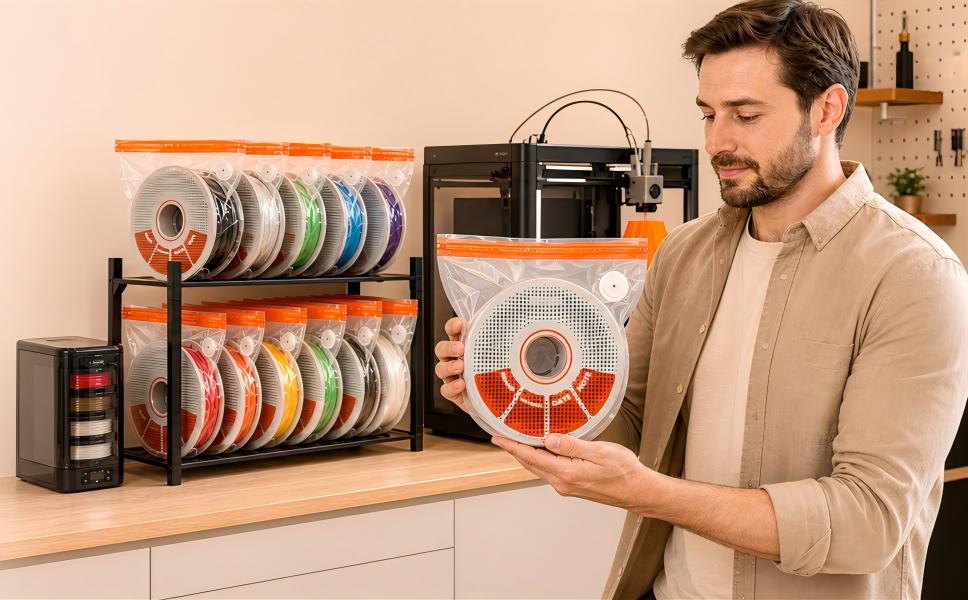
If your prints have started stringing, popping, or snapping along the layer lines, the problem usually isn’t your printer. It’s the filament. Knowing how to store 3D printer filament properly is the difference between a spool that prints the same on day 300 as it did on day one — and a spool that quietly turns into scrap while sitting on your shelf.
This guide covers what actually causes filament to degrade, the humidity targets for each material, the four storage methods compared honestly, and the mistakes that make people think their storage is working when it isn’t.
The short answer
Store 3D printer filament in an airtight container with desiccant, kept below 20% relative humidity, away from direct sunlight and temperature swings. For any spool you won’t use within a week, vacuum-seal it. PLA, PETG and ABS tolerate short exposure to room air; nylon, TPU and polycarbonate begin absorbing moisture within hours of opening.
Why filament absorbs moisture — and why it ruins prints
Most 3D printing polymers are hygroscopic: their molecular structure attracts and holds water molecules from the surrounding air. This isn’t water sitting on the surface that you can wipe off. It’s absorbed into the material itself.
The damage happens in the hot end. Your nozzle runs somewhere between 190°C and 260°C depending on material — far above water’s boiling point. Any moisture trapped inside the filament flashes to steam the instant it enters the melt zone. That steam has to go somewhere, and it escapes through the molten plastic as it extrudes.
What you see on the print bed:
- Popping and crackling as steam bursts out of the nozzle
- Stringing and oozing between travel moves, because the steam creates inconsistent pressure
- Rough, pitted surfaces where micro-bubbles broke through the extrudate
- Weak layer adhesion — parts that snap cleanly along layer lines instead of tearing
- Brittleness in the filament itself, especially with PLA, which can snap before it even reaches the extruder
Manufacturers publish drying specifications for exactly this reason. MatterHackers maintains a material-by-material reference that’s worth bookmarking if you print in engineering materials.
Humidity targets by material
Not all filaments are equally vulnerable. These are the practical targets to aim for in storage:
| Material | Target RH | Time to noticeable absorption | Notes |
|---|---|---|---|
| PLA | < 20% | Days to weeks | Most forgiving, but goes brittle over months |
| PETG | < 20% | 1–2 days | Stringing shows up fast |
| ABS / ASA | < 20% | Days | Surface finish degrades first |
| TPU | < 15% | Hours | Very absorbent; store sealed always |
| Nylon (PA) | < 10% | Hours | Starts absorbing the moment you open the bag |
| Polycarbonate | < 15% | Hours | Treat like nylon |
A cheap hygrometer inside your storage container is the only way to know where you actually stand. Ambient indoor humidity in most of North America sits between 40% and 60% — two to three times higher than any of these targets.
The four storage methods, compared
1. Open shelf (the default, and the worst)
Cost: free. Effectiveness: none. A spool on an open shelf is in continuous equilibrium with room air. If your workshop sits at 50% RH, so does your filament. This is fine for a spool you’ll finish this week and nothing else.
2. Sealed bin with desiccant
Cost: low. Effectiveness: good, with maintenance. A gasketed tote plus a few hundred grams of desiccant will hold 15–25% RH. The catch is volume — every time you open the lid you let a full container of humid air in, and the desiccant has to pull it back down again. Works best when you’re storing many spools you access rarely.
3. Vacuum bags with desiccant
Cost: low to moderate. Effectiveness: highest per dollar. Removing the air removes the moisture reservoir entirely — there’s almost nothing left inside for the filament to absorb. One spool per bag means opening one doesn’t expose the rest. This is the approach that scales best as your filament collection grows, which is why our filament vacuum storage bags are sized specifically for 250 g, 500 g and 1 kg spools rather than repurposed from clothing storage.
The trade-off: you need to re-seal after each use, which takes about 30 seconds with a pump.
4. Active dry box or filament dryer
Cost: highest. Effectiveness: excellent for the spool currently loaded. A heated dry box actively drives moisture out and lets you print directly from it. The limitation is capacity — it holds one or two spools. It solves the “printing right now” problem, not the “I own forty spools” problem. If a spool is already wet, start with how to dry wet filament before sealing it away.
Most people end up with a combination: a dryer for the active spool, vacuum bags for everything else. For a closer look at how flexible bags compare with rigid containers, see storage bags vs. storage boxes.
How to vacuum-seal a spool properly
Six steps. Most sealing failures come from skipping step 1 or rushing step 3.
- Inspect the bag and valve. Check the one-way valve seats flat and the zip track is free of filament dust. A single strand of plastic across the seal will leak.
- Add the spool and desiccant. Roughly 50–100 g of desiccant per 1 kg spool. Place it beside the spool, not under it.
- Close the zip and press out the bulk air by hand. Run your fingers along the track twice. Don’t rely on the pump to do this part.
- Pump it down. About 30 seconds with a powered pump. The bag should draw tight around the spool and hold its shape when you stop.
- Check the seal. Press the bag. If it springs back or you hear air moving, re-seat the valve cap and pump again.
- Label it. Material, color, brand, and the date you sealed it. This is the step everyone skips and everyone regrets.
If you’re setting this up from scratch, a filament vacuum storage kit with auto pump gets you bags, desiccant, pump and sealing clips in one go rather than sourcing each piece separately.
Desiccants: which type, and how to reuse them
There are two kinds worth using:
- Indicating silica gel changes color as it saturates — typically orange to green, or blue to pink. You can see at a glance whether it’s still working. This is what you want.
- Plain silica gel works identically but gives you no feedback. You’re guessing.
Rechargeable desiccant packs can be dried and reused indefinitely. Most recharge in an oven at around 100–120°C for 2–3 hours, or in a dedicated desiccant dryer. Check the manufacturer’s instructions — some packaging materials won’t survive oven temperatures.
Rule of thumb: if the indicator has changed color, the desiccant stopped protecting your filament some time ago. Check monthly rather than waiting until you notice a print problem.
Labelling and rotation — the part everyone skips
Once you own more than about ten spools, memory stops working. A label with four pieces of information solves it:
- Material and brand — because printing profiles differ between manufacturers
- Color — obvious through a clear bag, essential through a foil one
- Date sealed — tells you what to use first
- Print temperature that worked for you, if you’ve dialled it in
Then separate active spools from archived ones physically. Active spools live where you can grab them; archived spools stay sealed and undisturbed. Mixing the two means you open sealed bags to see what’s inside, which defeats the point.
Five mistakes that make good storage fail
- Sealing without desiccant. A sealed bag traps whatever humidity was in the room when you closed it. Without desiccant, that moisture stays with the spool.
- Never checking the desiccant. Saturated silica gel is inert. It looks the same as fresh silica gel if you’re not using the indicating type.
- Storing in a garage or basement. Temperature swings cause condensation inside containers — you can end up with liquid water against your filament.
- Using clothing vacuum bags. They’re sized for soft goods. A rigid spool creates folded corners under vacuum, and those folds are where leaks start.
- Treating dried filament as fixed. Drying removes the moisture that’s already there. If you put the spool back in the same conditions, you’re on the same clock again.
Frequently asked questions
Does 3D printer filament actually go bad?
Filament doesn’t expire like food, but it does degrade. Moisture absorption is the main cause and it’s reversible through drying. PLA also becomes progressively more brittle over long periods, which drying won’t fully reverse. Stored properly, most filament remains usable for years.
Can I store filament in a Ziploc bag?
It’s better than nothing and fine for short periods, but a zip bag still contains a full volume of humid air and the seal isn’t airtight over weeks. Add desiccant if that’s what you have available, and treat it as a temporary measure.
How long does filament last in a vacuum bag?
With a good seal and active desiccant, months to years. The limiting factor is usually seal integrity rather than time — check the bag is still drawn tight every few months and re-pump if it has relaxed.
Do I still need desiccant if I vacuum seal?
Yes. No vacuum seal removes 100% of the air, and no bag is perfectly impermeable over long periods. The desiccant handles what’s left and what slowly creeps in.
What humidity is too high for filament?
Anything above 20% RH will cause gradual absorption in most materials. Above 40% — which is normal indoor air — absorption is fast enough to affect print quality within days for PETG and within hours for nylon and TPU.
Should I store filament in the fridge or freezer?
No. Refrigerators are humid environments, and taking a cold spool out into warm room air causes condensation directly onto the filament. This makes the problem worse, not better.
Can wet filament be saved?
Often yes — drying removes absorbed water, though long humidity exposure causes permanent embrittlement that drying cannot reverse. Full detail, including drying temperatures by material, is in 7 signs your filament is wet.
How do I know if my filament is already wet?
Listen for popping at the nozzle, and bend a short length — brittle filament snaps easily. We cover all seven symptoms and how to tell them apart from settings problems in 7 signs your filament is wet.
Where to start
If you’re printing occasionally in PLA and finishing spools quickly, a sealed bin with indicating desiccant will cover you. If you own more than a handful of spools, print in PETG or anything more demanding, or find yourself troubleshooting print quality more often than you’d like, per-spool vacuum sealing is the step that actually holds.
Whichever route you take, the two things that matter most are the same: keep air away from the filament, and use indicating desiccant so you know your storage is still working.
You can browse our full range of filament storage solutions if you want to build a setup around your own spool count.